



Hybrid office design: How to make hybrid work for you
The benefits of hybrid work
Now, let's explore the advantages that the hybrid office model brings to the table. From employees’ well-being to employers’ bottom line, there are plenty of benefits you should know about.
Flexibility and autonomy
One of the most sought-after perks of a hybrid office is the flexibility it offers to employees. No longer bound to strict office hours, individuals can tailor their work to fit their lives (rather than fit their lives around work), creating a healthier work-life integration.
And, let’s be clear: Employees want a sense of agency, and the best way to give them that is to show them you trust them and are willing to provide them the conditions they need to do their best work. Put simply: If you empower them to do meaningful work instead of demanding they come to the office daily, the results will follow.
Cost efficiency
From the employer's point of view, a hybrid office can help you save money – and ensure every square foot of your office serves a purpose.
With fewer employees permanently based in an office, you can opt for smaller, streamlined office spaces, reducing rent and utility expenses.
Talent acquisition
Adopting a hybrid office model helps you expand your talent pool, because you can recruit top-notch professionals regardless of their geographic location.
This opens up new opportunities for innovation and collaboration.
Greater levels of productivity
Hybrid work gives employees the flexibility to work when and where they want (in the office or remotely) and choose the tasks they want to focus on in each location. Such levels of flexibility boost overall employee productivity.
Employees prefer coming to the office for collaboration, training, and spending time with colleagues and work on individual and admin tasks at home. But fully remote or in-person models don’t give employees the flexibility to choose in the same way they can do that with hybrid work.
Better collaboration and communication
Some in-office time gives the opportunity for chance encounters at the watercooler, after-work meetings, or casual chats in the office. All of those help employees network outside of their immediate teams, which helps spark innovation.

Office days can be essential for creativity and innovation – nothing beats a face-to-face brainstorming session if your team feels stuck
One survey found that while working remotely, most employees’ connections to their immediate work teams strengthened, but their interactions with distant networks diminished. And, as lockdowns eased and employees started returning to offices, communication with coworkers from other teams improved.
The challenges of hybrid and remote work
While hybrid arrangements are undeniably exciting, it comes with its fair share of challenges. Let's explore some of the hurdles organizations might face when implementing this model.
Communication and collaboration in a hybrid setting
One of the primary obstacles lies in maintaining effective teamwork between remote and in-person teams. Without intentional efforts to bridge those gaps, teams might become siloed, which brings overall productivity down.
Use communication platforms, define clear expectations, and set up regular check-ins to ensure that everyone feels connected, regardless of their physical location.
Managing performance and accountability remotely
Evaluating employee performance and maintaining high levels of accountability might be challenging in a remote or hybrid work environment. It can sometimes be difficult to assess productivity levels for hybrid employees, especially if tasks are not linear and don’t always lead to specific, measurable results.
That’s why it’s important to implement meaningful performance metrics, offer regular feedback, and promote a results-oriented culture.
How to assess your level of readiness for a hybrid work model
While there might be a growing demand for hybrid work globally, you’ll first need to consider what your employees want, whether you have the resources to go hybrid, and if there are any legal issues you need to resolve. Here are some questions to ponder:
- Are your employees ready for hybrid work? Run surveys before you impose hybrid work to understand employee preferences. Tackle any employee concerns upfront, and help ease up concerns by openly sharing proposed changes and plans.
- How will your leadership demonstrate support for hybrid work? Ask leaders if they’re willing to work from home two or three days a week to reinforce support for hybrid work. If not, employees might still believe the office to be the center of important conversations and opportunities – and fear they might be left out if they don’t come in daily.
- Are there any legal requirements you need to fulfill as a hybrid employer? Think about remote work laws that may also apply to hybrid work. For instance, ask your legal team if you need to reimburse employees for home office equipment and commutes and how to deal with overtime work laws, if they apply in your state or country.
- Will you need to redesign your office for hybrid work? Consider the activities your employees will use your office for, like collaboration or deep work, and the spaces required to accommodate these needs.
Tips for implementing hot desking and desk sharing successfully
If only part of your workforce comes to the office each day, it makes sense to have employees use desks on a rotating basis instead of giving everyone an assigned space. This practice is called hot desking.
Your employees might be averse to hot desking due to the loss of personal space or a perceived desk shortage. Address employee concerns directly and implement a desk booking software to make desk sharing a success in your office.
Here’s what else you need to consider:
- Share hot desking plans to garner support: Talk with your employees about your hot desking plans, the potential benefits, the rules, and the tools you want to use to manage desk sharing.
- Use advanced desk booking to avoid desk shortages: Ask employees to book desks on the days they’ll be in the office and specify the desk type they’ll use or the area in which they want to be seated. The best way to simplify desk booking is to use software like Officely.
- Set rules around desk etiquette: Ask employees to avoid eating at desks and to keep workspaces clean. Employees should also leave workstations as they find them and with all equipment properly stored for the next person. Find out more about the best desk-sharing etiquette rules to implement in a hybrid office environment.
- Design ergonomic workstations that fit different needs: Provide equipment like double monitors for employees who need them. Ensure all workstations are designed to prevent issues like back pain, eye strain, and headaches.
- Provide lockers to store belongings: Allow employees to store keepsakes like photo frames and calendars to make their temporary desk feel like their own.
How to write a clear hybrid work policy
Clear policies for both remote and in-person work will help create an equitable hybrid workplace where everyone’s treated fairly – and will help you share the details of employee benefits designed specifically for hybrid work.
- Explain hybrid eligibility for different roles in your office: Outline scenarios where onsite or customer-facing roles might request to work from home some of the time.
- Set your hybrid work model and schedule: Specify the number of remote workdays per week allowed in your office. Specify if employees can decide on their work-from-home days or if managers will set the schedule.
- Discuss employee compensation: If salary will be affected by an employee’s location or work preference, you need to be very clear about this in your policy – and check with HR how to do this in a fair way.
- Add additional wellness and health benefits: To help employees thrive in a hybrid environment, you can offer virtual health consults, on-demand stretching and yoga classes, access to running or other workout apps, and free mental health counseling.
- Summarize IT security measures: Explain that employees need to set strong passwords, use antivirus software and virtual private networks (VPNs) as needed, and activate two-factor authentication.
- Explain how you’ll track employee performance in a hybrid environment: Define success in terms of output or performance instead of hours worked. For example, “success for a content writer means X articles produced in Y weeks.”
- Emphasize equitability among workers: Implement measures like tracking employee promotions and announcing all advancement opportunities publicly, to everyone, to help combat any proximity biases.
- Set clear communication guidelines: Define what channels and tools to use, expected response times, and who to contact for questions.
- Review reimbursements to support hybrid work: Provide an adequate budget to set up a home office and reimburse employees’ internet connection and, potentially, some of their electricity costs.
Tools for creating a successful hybrid workplace
Whether onsite or remote, your employees will need technology to enable collaboration, productivity, and communication.
This isn’t an exhaustive list of tools for hybrid teams, but it’s a good starting point to help you work more efficiently.
Desk booking software
Desk-booking apps help avoid shortages of company resources like desks, amenities, tools, and conference rooms. Employees can reserve needed office space and equipment in advance, and managers can track attendance and manage capacity.
What to look for in a hybrid work app:
- Scalability: Consider if the software can accommodate the size of your team and the locations you need to manage.
- Top features: Apart from desk booking, look for the ability to log and measure attendance, and provide instant visibility to employees about who else is in. Also consider if it allows employees to book other amenities, too, like conference rooms and parking spaces (or spots for their pets).
- Ease of use: Make sure you picksoftware that’s easy to learn, navigate, and adopt. Ideally, the software should fit into your employees’ day-to-day workflows, so they use it consistently. Officely is available as a Slack add-on, which means employees don’t have to download or use another app.
Officely enables employees to book desks, meeting rooms, parking spaces, and more – and gives admin staff the ability to oversee office usage and ensure the office serves you and your employees well. Plus, it’s all in Slack or MS Teams.
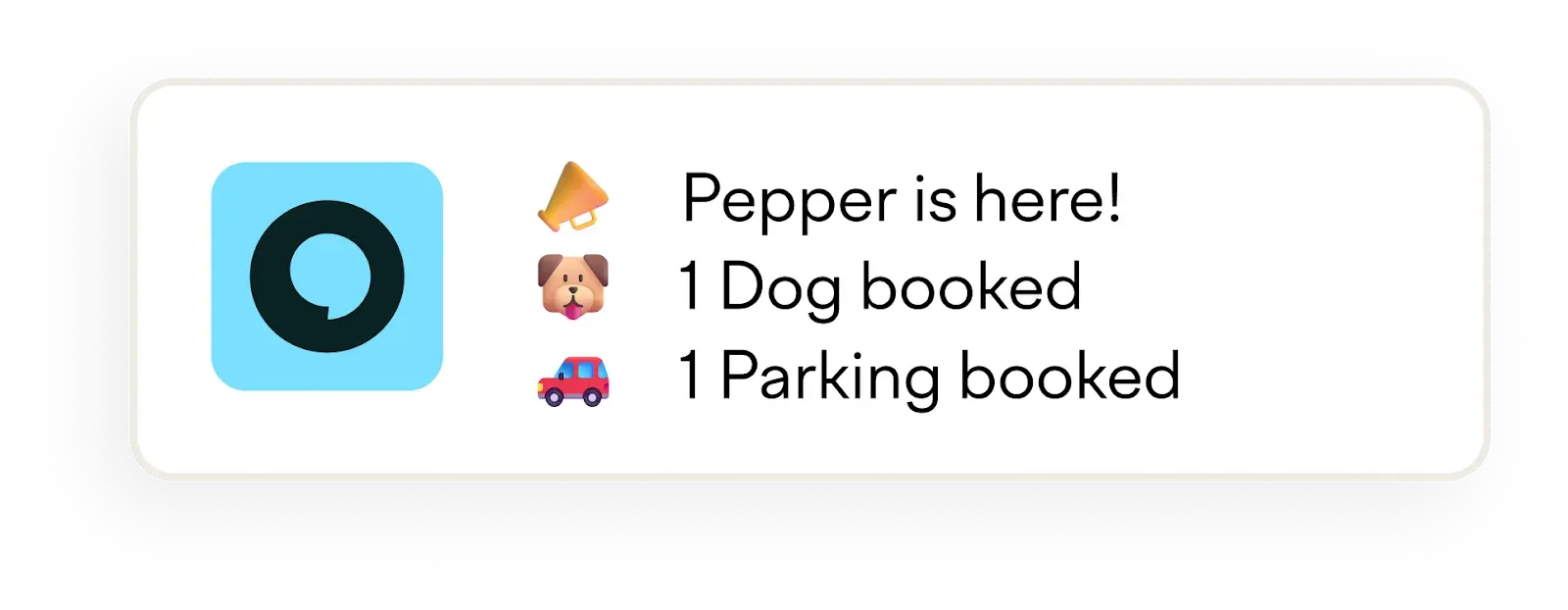
Officely enables employees to book not just desks, but also parking spaces and spots for their pets
Tools for hybrid events and meetings
While you don’t need new tools to make your hybrid meetings or events successful, some software and hardware built specifically for hybrid collaboration can be really helpful.
Tools like Meeting Owl are equipped with a 360-degree camera, speaker, and mic, so all remote attendees can clearly hear and see everyone in the room.
Portable speakerphones like Jabra Speak can be placed at the center of a conference or boardroom, so in-person attendees’ voices are clear to remote participants.
And, if you need something extra for larger events, we recommend hybrid event platforms like Webex to help you manage event registration, onsite badge printing, check-ins, set up video breakout rooms for networking, and allow participants to access event details and schedules from a single platform.
Communication and collaboration tools
Teamwork is essential in a hybrid workspace, so you don’t end up with silos or bottlenecks – and for this, you need the right tools. Here are some of our favorites:
- Slack: We probably don’t need to introduce the most famous chat platform for businesses. Slack allows teams to set up channels to discuss different topics and projects and also offers add-ons like Donut, which help remote teams stay connected.
- Microsoft Teams: If you’re using Microsoft’s office suite to collaborate, MS Teams is the logical expansion to that. It’s a tool that integrates seamlessly with it and offers calls, chats, group channels, and more – and allows up to 10,000 participants to join a video conference call.
- Google Workspace: Professional email tool to create a corporate email account associated with your domain for all employees. Also offers file storage and sharing as well the ability to start voice and video calls.
- …Or Proton for Business: If you’re looking for a privacy-first alternative to Google Workspace or Microsoft 365, Proton is currently building a business suite that offers airtight protection to your business data and doesn’t use it to train LLMs or other algorithms.
- Notion: Notion allows teams to build a company wiki or an internal knowledge base. You can use Notion to store employee information, policy documents, company goals, and manuals.
- Soapbox by Wistia: Soapbox is a webcam and screen recording tool for Chrome to share videos with your team, and allows teams to explain processes and tasks to employees or clients.
Finally: A quick guide to successfully managing hybrid teams
Managing hybrid teams can be tricky because managers need to cater to in-office and remote employees simultaneously, while providing them with a consistent work experience.
To support your employees in a hybrid environment, you need to give sufficient resources for remote work, offer employees the flexibility to set their schedule, and provide ample feedback.
Provide consistent benefits and resources
To keep employees’ experience consistent across locations, provide the same equipment – laptops/computers, internet connection, firewall, and a VPN – for their home office, too. You can also provide a monthly stipend to cover work-from-home expenses, along with a home office setup budget.
If you provide in-office benefits like gym rooms or childcare, make sure you offer similar benefits to your entire workforce.
Let employees set their hybrid work schedule
We firmly believe that hybrid schedules should be employee-led and not manager-led, in order to boost employee productivity and happiness.
By allowing your people to choose their workplace depending on their tasks for the day, you give them autonomy and ownership over their work – and encourage a healthy work-life balance.
To make the most of employee-led hybrid scheduling:
- Use desk booking software, so employees can book space in advance and avoid overcrowding the office
- Schedule specific times for social interactions to encourage team bonding
- Ensure employees have access to meetings and events, irrespective of office presence
Make hybrid meetings the norm – and design better meetings
Hybrid meetings allow all employees to be part of decision-making and brainstorming, regardless of where they’re working.
As an added perk, hybrid meetings also offer complete flexibility for employees with their hybrid work schedule since employees don’t have to be in the office for meetings.
To host better meetings, ensure that:
- There’s a clear meeting agenda – we all hate endless meetings or invitations to calls without any predefined goals, right?
- You’re able to stick to the start and end time
- You have the right tech so that everyone can hear and see everyone else
Specifically, if a few people are joining from the same room in the office, you’ll need:
- External cameras
- Microphones
- Speakers
- A large screen
For specific recommendations, check out our best tips and tools for hybrid meetings.
We also advise you to assign a moderator or facilitator (someone other than the meeting host) to keep an eye on comments from remote participants and cues like hand-raises or someone unmuting themselves.
In large meetings, moderators can also relay feedback and questions from in-room participants to virtual attendees and vice-versa. To encourage remote attendees to participate, open questions and discussions to them first, and then to the room.
The future of work: Embracing hybrid office design
The hybrid office represents a major shift in how we all work – but to create a hybrid environment that works for everyone, you need the right workflows and tech.
Officely can help you design a hybrid workspace thanks to its powerful features like desk booking, office attendance visibility, and resource management, all built into the platforms your team already knows, like Slack and Microsoft Teams. This makes it easy for everyone to adopt it and start using it on day 1, without any steep learning curves. Book a demo to find out more and get started.
Want to take a deeper dive into creating a flexible and productive workspace? Check out our Complete Guide to Office Management for Flexible Workplaces.


