


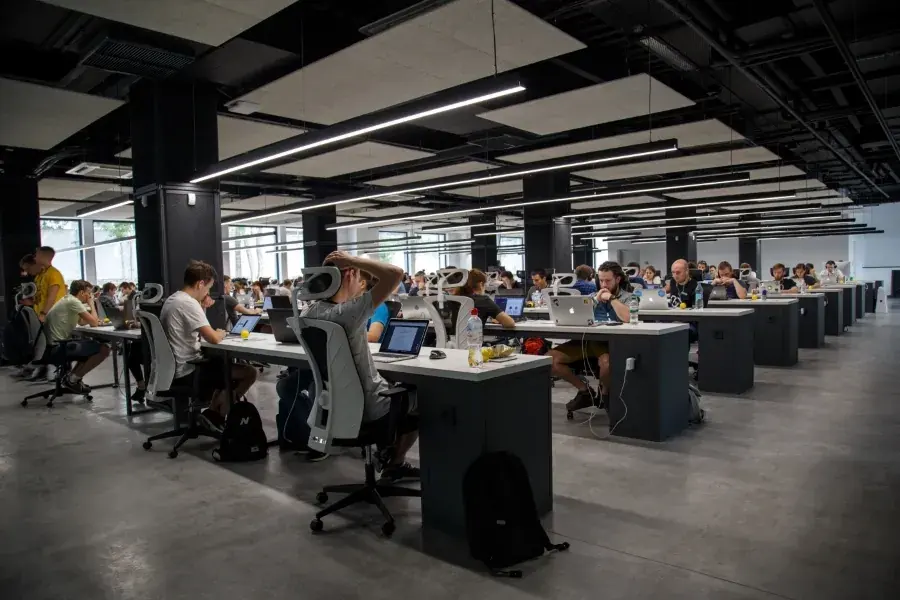
6 Tips to Implement Hot Desking (or Desk Sharing) While Keeping Employees Happy
While desk sharing offers many benefits to businesses, employees may not always support it due to a loss of personal workspace and anxiety around the availability of desks.
Here are six practical tips to ensure a hassle-free transition to hot desking:
1. Share hot desking plans with employees to prepare them for the switch
Hot desking can be a significant change—employees may be anxious about personal belongings, whom they’ll sit next to, and hygiene. The more you share about how hot desking helps your business and how you plan to manage the change, the more likely you are to soothe concerns around desk sharing.
Common methods for organizational change management (like ADKAR and nudge theory) hinge on proactive communication.
For instance, the ADKAR model involves outlining the following:
- Awareness: Inform employees about the shift to hot desking, highlighting current pain points and potential cost savings.
- Desire: Share benefits of hot desking like flexible schedules to get employees excited about the change.
- Knowledge: Inform employees about rules and best practices to make desk sharing a success.
- Ability: Introduce any tools or systems you’ll use to manage desk sharing easily.
- Reinforcement: Share rewards and consequences for appropriate and unsuitable employee behavior when desk sharing. Sample rewards might include shout-outs in the monthly newsletter or a $50 cash reward.
2. Use advanced desk booking to avoid desk shortages
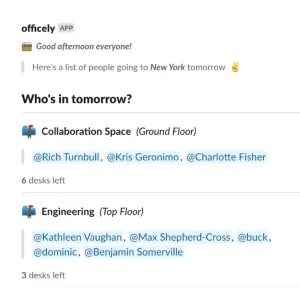
Hot desking can be a logistical nightmare and a time waster for employees trying to claim a desk on the day they check into work. Hot desking works best with a desk booking (or hoteling) system.
To make desk booking work, assign numbers or color codes to desks in your office. Another option is to divide desks into neighborhoods based on department (marketing, sales, support) or desk type (standing desk, double monitors, collaborative space).
Let employees log the days they’ll be in the office and the desk type they’ll work on (based on color, number, or neighborhood).
This kind of manual desk booking can also be a chore, which is why automated desk booking software like Officely is a great choice for companies using hot desking.
Here’s how it works: HR or office managers sign up their team onto a desk booking app, and employees choose the days they’ll be in the office and book an available desk or space in advance.
While booking a desk, employees can also see who else is coming in to work that day and where they’ll sit. Such visibility helps employees plan whether they should focus on collaboration or deep work on a given day.
For managers, desk booking software offers automated allocation of hot desks and better visibility of employees’ work schedules.
3. Set ground rules around desk etiquette
Since employees don’t have designated desks when hot desking, they may not be as diligent about desk cleanliness and organization. Hot desking rules ensure everyone uses office space in a fair and responsible manner.
Here’s a set of rules for better use of hot desks:
- Cleanliness: “Don’t eat at your desk. Sanitize and tidy your desk after use.”
- Consideration: “Don’t talk loudly in a space for deep work.”
- Maintenance: “Leave workstations as you find them. Do not unplug wires from screens, keyboards, and mice. Don’t leave personal belongings on your desk.”
- Choosing a desk: “Avoid reserving spaces for specific groups and report such activities.”
Further, if you want everyone to follow and respect the rules, make sure the rules are the same for all hot deskers, whether it’s your director of operations or a junior copywriter.
4. Design workstations to meet health and equipment needs
Design all workstations to address common health issues like back pain and eye strain. Also, furnish some workstations with special equipment like two monitors for employees who need them.
Some laws like the Health and Safety (Display Screen Equipment) Regulations 1992 in the UK require employers to assess workstation safety for employees and ensure they don’t cause issues like eye strain, pain in the back, hands, and wrists, and headaches.
To prevent common health issues like these, equip all workstations with adjustable chairs with lumbar support and adjustable desks. Offer a limited number of standing desks too, if some employees prefer these.
As for special equipment, you can add external mice and keyboards, headsets, and extra monitors to a limited number of desks. Also, if employees use desk phones for calls, consider using hot desking phone connections.
Hot desking phones allow employees to log into a phone system using their extension and PIN, so they can make and receive calls on their phone number while switching desks.
5. Keep designated spaces for collaboration and deep work
Most standard offices have facilities like conference rooms, kitchens, and a lounge, along with rows of open-plan desks.
With hot desking, though, you’ll need fewer desks and more spaces to collaborate, do deep work, and take important calls, as employees mainly come to the office for such tasks.
Consider adding these spaces to your office, so employees can choose a space depending on what their workday looks like:
- Standard workstations for individual work
- Bookable meeting room/conference rooms for in-office or hybrid meetings
- Bookable rooms for phone calls and meetings with clients or others
- Casual, coffee-shop style seating for teams to brainstorm ideas
- Breakout areas for spontaneous chats and meetings
- Quiet areas for individual deep work (i.e., desks away from cafés, kitchens, and breakout areas)
- Kitchen, lounge, or café
Depending on the size of your team and the resources you have, you might not need or be able to build all of these spaces.
Use this list as a starting point to think about how to change your office design while desk sharing.
6. Provide lockers to store equipment and belongings
One of many employees’ pet peeves with hot desking is the lack of personalization—hot desks just don’t feel like your own desk without your family photo or special devices you’re accustomed to. Carrying these items to work every other day isn’t ideal either.
A simple workaround is to provide lockers to employees to store personal belongings and equipment, so they don’t have to lug them around.
Employees might use lockers to store personal items like mugs, hand-written labels, family photos, sticky notes, and stationery.
Some employees may also store personal equipment like headsets and their preferred keyboard or mouse in their locker.


