



How to Host a Hybrid Event: The Ultimate Guide
5 Tips for Hybrid Events That Engage In-Person and Remote Attendees
An engaging hybrid event is a combination of the right tools, activities, and opportunities for interaction between both in-person and virtual attendees.
Before you get started, it's worth investing in an integration or tool that displays your employees' working location, especially if your team are able to work from a variety of places.
Here are some tips to get each of these right for your hybrid event:
1. Set up tech and tools for audiovisual clarity
For both sets of attendees to share the same event experience, remote participants should be able to see and hear live event activities clearly, while in-person attendees should be able to interact with virtual attendees.
We've discussed the tech setup for hybrid meetings in a previous post. Your hybrid event tech setup might not differ drastically, but it might be more elaborate, depending on the scale of your event.
You'll need meeting or conference software like Zoom or a special hybrid event platform to host your event (more on this below). You'll also need a device like a laptop, tablet, or PC to host the event from your physical venue.
To boost audiovisual clarity for virtual and in-person attendees in a hybrid event, you'll need:
- An extra set of microphones, so virtual attendees can hear in-person participants
- An extra set of speakers, so in-person attendees can hear remote attendees clearly
- Extra cameras for remote attendees to see live activities
- Extra screens for in-person participants to see remote ones
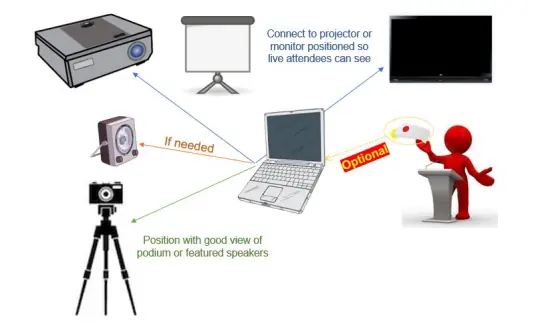
Hybrid meeting tech set up
For smaller events, like a team hangout conducted in a single room, a set of extra speakers, microphones, a screen, and an external camera might do the trick.
For larger events, like a multi-day conference or day-long annual meeting conducted in multiple spaces or rooms, you'll need:
- Multiple cameras to display different audience angles and activities
- External speakers in various locations
- Multiple microphones for in-person speakers
- Large screens to display remote attendees
For large-scale events, consider hiring professional video and audio teams to manage event production if you have the budget.
2. Deliver event swag and food to virtual attendees, too
Event accessories like sweatshirts and food and beverages are the icing on the cake for any event. Deliver these to remote attendees, too, so they can enjoy the complete experience like their in-person counterparts.
Depending on where your employees are based, look for delivery apps such as Grubhub and DoorDash to deliver event goodies to remote employees. Ask remote employees about their food preferences beforehand and plan deliveries accordingly.
As for event swag, think lanyards, company badges, stickers, bags, giveaway prizes, and sweatshirts. Services like Swag.com and Gifts for the Good Life can help you create customized swag boxes for virtual events and also deliver them to your employees.
3. Use a hybrid event platform to host your event
While a tool like Zoom Events might suffice to host a simple hybrid event, consider a more robust platform for large events like a conference.
A hybrid event platform or software acts as a common virtual venue for in-person and virtual attendees to interact with each other. Additionally, such platforms also offer registration for both sets of attendees and analytics features, so you can manage event logistics in one place.
Other features to look for in potential hybrid event platforms include:
- Compatibility with common browsers
- Q&A sessions where attendees can submit questions in advance
- Gamification to add virtual games and challenges to your hybrid event
- Networking sessions or breakout rooms
- Polls
Hybrid event technology is still immature, so beware of tools that promise too much but deliver little. If possible, test the tool or ask for a demo. Check out user reviews on software review sites, too, to get an idea of the tool’s shortcomings.
4. Assign moderators for Q&A sessions and group discussions

Hybrid event moderator
In an event with lots of virtual and in-person attendees, it’s easy for the event host or speaker to miss questions and comments in the virtual chatbox. Moderators can keep a tab on the chat and ensure all virtual attendees’ comments and questions are answered.
Consider assigning two sets of moderators, one in-person and one virtual, to monitor the live chat. Apart from relaying questions and answers to and from virtual attendees, moderators can also:
- Encourage participation in event games
- Attract attention to the leaderboard for event games.
- Help attendees with other queries, like how to access an on-demand video
5. Provide networking opportunities for both sets of attendees
One of the main perks of attending a live event is the ability to interact with speakers, VIPs, and other attendees as you move around the event hall. In a hybrid event, too, you need to facilitate ways for remote and in-person attendees to interact with each other.
Online chat rooms and discussion groups are one way of encouraging interaction, but consider adding more opportunities for one-to-one interaction or smaller group discussions.
One way to offer closer interaction is to set up breakout rooms or video rooms—like those in the event app Socio—so attendees can connect with each other in a small, intimate setting. Attendees can enter a video room based on their interests or location and socialize with others.
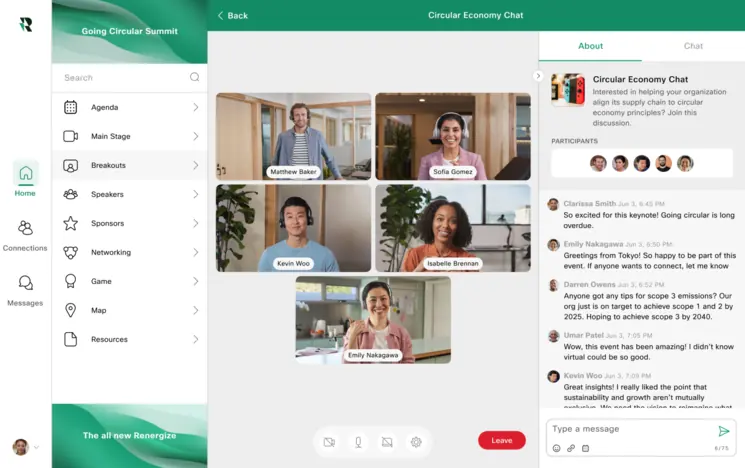
The Socio hybrid event platform
To make it easy for in-person attendees to access virtual networking rooms, install multiple screens or laptops at the physical venue.
Another option is to host group games like Bingo, escape rooms, or scavenger hunts to help attendees bond. Apps like reElivate can help you organize these in a virtual setting. For instance, for escape room games, the app offers a 360-degree view of the room to all participants, where they can move objects and brainstorm ways to escape.

Hybrid event escape room


